
ERD to Tables, JOIN Counts, Foreign Key Mechanisms, GROUP BY & INSERT Defaults (2024 Moed A)
- #past-paper
- #databases-sql
- #erd
- #joins
- #foreign-key
- #constraints
- #group-by
- #insert
Databases & SQL: 2024 Moed A (course code 3437)
Course: Databases & SQL, Uri Goldstein. Written exam, 5 questions at 20 points each (100 total). Bilingual paper; this note follows the English lines. Which paper is this? There is another 2024 Moed A in this course (PP_01), but that one has course code 2455. This one is 3437. Key concepts: Entity-Relationship Diagram, Foreign Key, Primary Key, UNIQUE Constraint, NOT NULL Constraint, CHECK Constraint, CROSS JOIN, INNER JOIN, LEFT JOIN, FULL OUTER JOIN, Referential Integrity, Index, GROUP BY, HAVING, AUTO_INCREMENT, DEFAULT Constraint
Answers from the instructor's answer file (unlabelled, treated as official).Question text and the answers are in the same PDF, signed "Uri". All five questions have an answer, so nothing here is AI-solved. Where I add something beyond the key (a count, a bound, a MySQL note) it is marked as an extension.
Two typos in the key
- Q2.1 says "CORSS JOIN". Corrected here to CROSS JOIN.
- Q5.1 fills the title as
Dralthough the statement inserts'Dr.'. The stored value isDr.(with the full stop); the key'sDris a typo.
What this paper tests
| Q | Topic | Pts |
|---|---|---|
| 1 | Turning an ERD into tables, FKs, and column constraints (UNIQUE, NOT NULL, CHECK) | 20 |
| 2 | How many rows each JOIN type returns, given only table sizes (6 and 3) | 20 |
| 3 | The three mechanisms behind a foreign key; joining without the constraint | 20 |
| 4 | Reading a query: JOIN type, relationship type, WHERE vs GROUP BY vs HAVING | 20 |
| 5 | Which INSERTs succeed given NOT NULL, DEFAULT and AUTO_INCREMENT | 20 |
IntuitionThe unlocking idea for the whole paper: constraints and keys decide what a table will accept, and JOIN type decides what a query will return. Most answers come from asking "which rows are guaranteed to exist?" (Q2) or "which rule is the database enforcing?" (Q1, Q3, Q5).
Q1: ERD to relational tables [20 pts]
Question. Examine the ER diagram below. It describes 4 entities. It can be said that the "grade" entity represents a many-to-many-to-many relationship between the other 3 entities. Imagine you are tasked with implementing the ERD as a relational (SQL-based) database.
The paper's own diagram (real data, cropped from the exam):
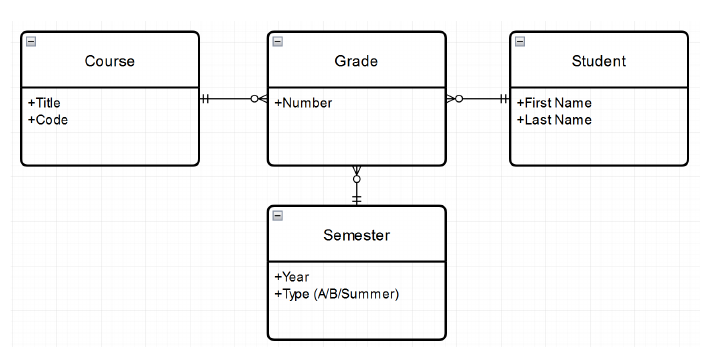
Course, Student and Semester each have a one-to-many link to Grade (one course, student or semester can have many grades; each grade belongs to exactly one of each). Redrawn as a logical ERD with the keys the answer implies (the id columns are my naming, not in the paper):
erDiagram
    COURSE ||--o{ GRADE : "has"
    STUDENT ||--o{ GRADE : "receives"
    SEMESTER ||--o{ GRADE : "contains"
    COURSE {
        int course_id PK
        varchar title
        varchar code
    }
    STUDENT {
        int student_id PK
        varchar first_name
        varchar last_name
    }
    SEMESTER {
        int semester_id PK
        int year
        varchar type
    }
    GRADE {
        int grade_id PK
        int number
        int course_id FK
        int student_id FK
        int semester_id FK
    }
1.1 Number of tables [5 pts]
Answer4 tables, one per entity:
student,course,semester,grade.
Why. Each entity becomes a table. The "many-to-many-to-many" grade entity is already a junction (link) entity: it is a real table that holds the grade value and the links to the other three, so no extra table is needed.
1.2 Foreign keys [5 pts]
Answer3 foreign keys, all in the
gradetable:
gradetostudentgradetocoursegradetosemester
Why. A foreign key always lives on the "many" side of a one-to-many relationship, pointing at the "one" side. grade is the many side for all three relationships, so all three FKs sit in grade. See Foreign Key and Primary Key.
1.3 Every course has a different code [3 pts]
AnswerAdd a UNIQUE constraint on the
codecolumn of thecoursetable. It prevents any value from appearing in more than one record of that column.
ALTER TABLE course
ADD CONSTRAINT uq_course_code UNIQUE (code);
(The ALTER form and constraint name are my illustration; the key only names the constraint.) See UNIQUE Constraint.
1.4 A grade must have a numeric value [3 pts]
AnswerApply a NOT NULL constraint to the
numbercolumn of thegradetable. It prevents NULL values (unknown) from being entered into the column.
number INT NOT NULL
See NOT NULL Constraint.
1.5 The grade must be between 0 and 100 [4 pts]
AnswerAdd a CHECK constraint on
numberin thegradetable:
CHECK (number BETWEEN 0 AND 100)
The constraint prevents values that do not satisfy its predicate from entering the column.
TrapNOT NULL alone does not limit the range, and a CHECK alone would still let NULL in (a CHECK passes when the predicate is unknown). That is why 1.4 and 1.5 are separate requirements needing two constraints. See CHECK Constraint.
Q2: JOIN row counts from table sizes [20 pts]
Question. A MySQL database has two tables, fish and bicycle. The fish table contains a foreign key pointing to bicycle. fish has 6 records and bicycle has 3 records; the exact contents are not given. Using only this, answer the questions about JOINs with fish on the left and bicycle on the right.
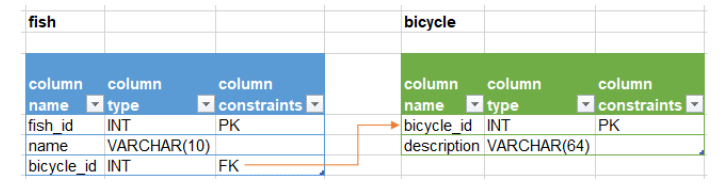
erDiagram
    BICYCLE ||--o{ FISH : "bicycle_id"
    FISH {
        int fish_id PK
        varchar name
        int bicycle_id FK
    }
    BICYCLE {
        int bicycle_id PK
        varchar description
    }
2.1 What JOIN does this query output? [5 pts]
SELECT *
FROM fish
INNER JOIN bicycle;
AnswerA CROSS JOIN, because the query has no
ONclause and noUSINGclause, and theINNERkeyword has no real effect on the result.
Typo fixedThe key spells it "CORSS JOIN". It means CROSS JOIN.
Working (extension, not in the key). A CROSS JOIN pairs every left row with every right row, so it returns 6 x 3 = 18 rows.
Intuition
INNER JOINis supposed to filter to matching pairs, but with no condition there is nothing to match on, so nothing is filtered. In MySQL a JOIN without a condition is legal and behaves as a cross join. See CROSS JOIN and INNER JOIN.
2.2 Row count of a LEFT JOIN [5 pts]
Answer6. A LEFT JOIN outputs a record for every row of the left table, and the left table is
fish(6 records).
Working. Each of the 6 fish appears at least once. If a fish has no matching bicycle, it appears once with NULLs on the bicycle side. Because bicycle_id is the primary key of bicycle, a fish can match at most one bicycle, so no fish is duplicated. Result: exactly 6.
Why it can be knownIt works only because the join is on the FK to the PK (at most one match per fish). If the right side could match a fish several times, the count could exceed 6. See LEFT JOIN.
2.3 Row count of an INNER JOIN [5 pts]
AnswerCannot be known. An INNER JOIN returns only records that have a match on the other side, and the number of matches is not given.
Extension (my bound, not in the key). Since the FK points to a PK, each fish matches at most one bicycle, so the count lies between 0 and 6. If fish had bicycle_id NULL or unmatched, they drop out. Not enough to give one number.
2.4 Row count of a FULL OUTER JOIN [5 pts]
AnswerCannot be known. The row count depends on how many records on each side match, and this is not given.
Extension (my bound, not in the key). Let m be the matched fish. Output = matched rows + unmatched fish + unmatched bicycles = m + (6 - m) + (unmatched bicycles, from 0 to 3) = 6 to 9 rows. Still a range, not a number.
MySQL noteMySQL has no
FULL OUTER JOINkeyword; it is emulated withLEFT JOIN ... UNION ... RIGHT JOIN. The question treats it conceptually. See FULL OUTER JOIN.
| JOIN | Count | Known? | Reason |
|---|---|---|---|
| CROSS (no ON) | 18 | Yes (extension) | 6 x 3, every pair |
| LEFT | 6 | Yes | all left rows kept |
| INNER | 0 to 6 | No | matches not given |
| FULL OUTER | 6 to 9 | No | matches not given |
Q3: The three mechanisms of a foreign key [20 pts]
Question. A FOREIGN KEY is a link from a CHILD TABLE to a PARENT TABLE. To implement it the child table must contain 3 different things (database mechanisms).
3.1 Complete the table [15 pts]
Answer
Name Role Points A COLUMN Contains values that link to the parent table's primary key. 5 B CONSTRAINT Ensures column values come from the parent table's PK (REFERENTIAL INTEGRITY). 5 C INDEX (KEY) Speeds up querying data by the column, and as a result speeds up JOIN operations based on it. 5
(The filled-in cells were the blank ones in the exam: the names for A, B, C, and the description for C.)
Why three. The column stores the link, the constraint stops bad links, the index makes the link fast to follow. In MySQL, defining a FOREIGN KEY constraint creates the index automatically if none exists. See Foreign Key, Referential Integrity, Index.
3.2 Join on an FK column without the constraint? [5 pts]
AnswerYes, it is possible to JOIN on the FK column. But without the constraint, mistakes can occur in the output because of values in the column that are not present in the parent table's PK.
IntuitionA JOIN only compares values; it does not care whether a constraint exists. Without the constraint, "orphan" values can exist (a
bicycle_idof 99 with no bicycle 99), so an INNER JOIN silently drops those rows and results become misleading.
Q4: Reading a query [20 pts]
SELECT
    dept_name,
    COUNT(employee_id) AS num_of_employees
FROM employee
JOIN department USING (dept_id)
WHERE hire_date >= '2024-01-01'
GROUP BY dept_name
HAVING COUNT(employee_id) > 5
ORDER BY num_of_employees DESC;
4.1 What does the query return? [5 pts]
AnswerA list of departments and the number of employees in each, counting only employees hired this year (2024), and only departments with more than 5 such employees. Output is sorted by the number of employees, highest to lowest.
Order of evaluation
WHEREruns first, so the count is of 2024 hires, not all staff. A department with 20 staff but only 3 hired in 2024 is excluded byHAVING.
Unnumbered part: which JOIN type? [4 pts]
AnswerINNER JOIN. The keyword
JOINappears withoutLEFTorRIGHT, and aUSINGclause is present.
Plain JOIN is shorthand for INNER JOIN. USING (dept_id) supplies the join condition and appears once in the output.
4.2 Relationship type between the tables [5 pts]
AnswerOne-to-many (each department has several employees). Many-to-many is ruled out because only 2 tables are involved (it would need a third, junction, table). One-to-one is ruled out because each output record represents a group of several records from
employee.
NumberingIn the paper the JOIN-type question (4 pts) has no number of its own and sits between 4.1 and 4.2. Marks: 5 + 4 + 5 + 6 = 20.
4.3 Role of WHERE, GROUP BY, HAVING [6 pts]
Answer
- WHERE filters records based on raw data (employee hire dates).
- GROUP BY groups raw records into grouped data based on one or more columns (department /
dept_name).- HAVING filters records based on grouped data (the number of employees in each group).
| Clause | Acts on | Here |
|---|---|---|
WHERE |
individual rows, before grouping | hire_date >= '2024-01-01' |
GROUP BY |
builds the groups | one group per dept_name |
HAVING |
whole groups, after grouping | COUNT(employee_id) > 5 |
Intuition
Q5: Will the INSERT succeed? [20 pts, 5 each]
Each command is independent and the table is empty and reset before each one.
CREATE TABLE author (
    author_id INT PRIMARY KEY AUTO_INCREMENT,
    title VARCHAR(32) NOT NULL DEFAULT '',
    first_name VARCHAR(256),
    last_name VARCHAR(256) NOT NULL
);
| Column | Rule when no value is given |
|---|---|
author_id |
AUTO_INCREMENT generates 1, 2, ... |
title |
NOT NULL but has DEFAULT '', so the empty string is used |
first_name |
nullable with no default, so NULL |
last_name |
NOT NULL with no default, so it is mandatory |
5.1 [5 pts]
INSERT INTO `author` (author_id, title, first_name, last_name)
VALUES (1, 'Dr.', 'Phil', 'Good');
Answer: succeeds
author_id title first_name last_name 1 Dr. Phil Good
All four values are supplied, so nothing is generated or defaulted. (The key prints Dr; that is a typo, see the warning at the top.)
5.2 [5 pts]
INSERT INTO `author` (first_name, last_name)
VALUES ('Foo', 'Bar');
Answer: succeeds
author_id title first_name last_name 1 (empty string) Foo Bar
author_id is auto-generated (1 on an empty table) and title takes its DEFAULT, the empty string '' (not NULL).
5.3 [5 pts]
INSERT INTO `author` (title, last_name)
VALUES ('Mr.', 'Smoketoomuch');
Answer: succeeds
author_id title first_name last_name 1 Mr. NULL Smoketoomuch
first_name is nullable and has no default, so it becomes NULL.
5.4 [5 pts]
INSERT INTO `author` (title, first_name)
VALUES ('Dame', 'Edna');
Answer: failsExecution fails with an error because no value was given for
last_name, which has a NOT NULL constraint and no DEFAULT constraint to supply a value.
Intuition
titleis also NOT NULL, but it is safe because it has a DEFAULT.last_nameis the only column that is both NOT NULL and default-less, so it is the only one you can forget.
See NOT NULL Constraint, DEFAULT Constraint, AUTO_INCREMENT.
Recap
| Q | Tool | One-line answer |
|---|---|---|
| 1.1 | Entity to table | 4 tables: student, course, semester, grade |
| 1.2 | Foreign key | 3 FKs, all in grade |
| 1.3 | UNIQUE | on course.code |
| 1.4 | NOT NULL | on grade.number |
| 1.5 | CHECK | number BETWEEN 0 AND 100 |
| 2.1 | CROSS JOIN | no ON/USING, so every pair (18 rows) |
| 2.2 | LEFT JOIN | 6, all left rows |
| 2.3 | INNER JOIN | unknown, matches not given |
| 2.4 | FULL OUTER JOIN | unknown, matches not given |
| 3.1 | FK mechanisms | column, constraint (referential integrity), index |
| 3.2 | JOIN without constraint | possible, but orphan values can mislead |
| 4.1 | Query reading | departments with more than 5 hires in 2024, count, descending |
| 4 (unnumbered) | JOIN type | INNER (plain JOIN plus USING) |
| 4.2 | Relationship | one-to-many |
| 4.3 | Clauses | WHERE raw rows, GROUP BY groups, HAVING groups |
| 5.1 | INSERT | succeeds, all values given |
| 5.2 | INSERT | succeeds, id 1, title '' |
| 5.3 | INSERT | succeeds, first_name NULL |
| 5.4 | INSERT | fails, last_name NOT NULL, no default |
Related notes
- Databases & SQL (course hub)